

Mastering Video Production: Strategies for Engaging and Professional Content
Understanding Video Production
What Is Video Production?
Video production is the process of creating content that conveys a narrative, message, or information through moving images and sound. This multifaceted art combines several disciplines, including scripting, directing, filming, editing, and post-production. The ultimate goal is to produce high-quality videos that engage viewers effectively and resonate with intended audiences. Engaging videos are increasingly vital for businesses, educators, and content creators, making a solid understanding of video production essential to success.
The Phases of Video Production
The video production process is typically divided into three primary phases: pre-production, production, and post-production.
- Pre-Production: This stage involves planning and organizing all aspects of the video before filming begins. Key activities include scriptwriting, storyboarding, location scouting, budgeting, and scheduling.
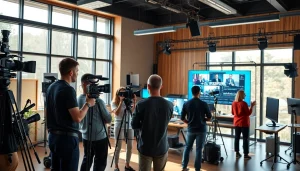
- Production: The actual filming takes place during this phase. It involves capturing video footage and audio with cameras and sound equipment, often involving a crew that includes directors, cinematographers, and sound engineers.
- Post-Production: Once filming is complete, the editing process begins. This includes assembling footage, adding effects, color grading, sound design, and exporting the final product for distribution.
Key Terms in Video Production
Familiarity with specific terminology enhances communication among industry professionals. Here are a few essential terms:
- Shot: A continuous sequence captured by a camera.
- Frame Rate: The number of frames captured per second, influencing the speed and smoothness of motion.
- Script: The written narrative that guides the video’s content and structure.
- Post-Production: All tasks and processes that take place after the filming is complete.
Essential Equipment for Video Production
Cameras and Accessories
The heart of any video production is undoubtedly the camera. Depending on budget and project needs, various cameras are available, ranging from DSLRs and mirrorless models to professional cinema cameras. Essential accessories to consider include:
- Tripods: To ensure stable shots and reduce shake.
- Gimbals: For smooth, stabilized video during movement.
- Lenses: Different types of lenses can create varied visual effects.
- Memory Cards: High-speed cards to handle large video files.
Lighting and Sound Gear
Effective lighting and sound equipment are crucial in achieving a polished final product. Poor audio or lighting can detract from even the best footage. Essential equipment includes:
- Light Kits: LED panels, softboxes, and reflectors to control lighting conditions.
- Microphones: Lavalier, shotgun, or condenser mics to capture clear audio.
- Sound Recorders: For capturing high-quality audio separately from the camera.
Editing Software Choices
The post-production phase involves editing software that allows creators to cut, arrange, and enhance video footage. Popular options include:
- Adobe Premiere Pro: A powerful, industry-standard editing tool.
- Final Cut Pro: Favored by many Mac users for its intuitive interface.
- DaVinci Resolve: Offers advanced color correction and visual effects.
Best Practices for Video Production
Pre-Production Planning
Successful video productions are built on solid pre-production planning. This involves defining your objectives, researching your audience, and developing a clear script and shot list. Meeting with your crew before filming can help clarify everyone’s roles and expectations.
Filming Techniques and Tips
During filming, attention to detail matters. Here are useful tips for high-quality footage:
- Use a variety of shots—wide, medium, and close-ups—to keep the visual interest alive.
- Be mindful of framing and composition; utilize the rule of thirds to guide the viewer’s eye.
- Check sound quality continuously; wind and background noise can ruin your audio.
Post-Production Editing Workflows
A well-defined editing workflow ensures efficiency. Follow these steps:
- Organize raw footage into folders by scene or day of shooting.
- Use proxies if working with high-resolution footage to enhance performance.
- Create a rough cut first before fine-tuning edits and transitions.
Improving Video Quality
Understanding Frame Rates and Resolutions
Frame rates and resolutions significantly impact video quality. Use higher frame rates such as 60fps for smooth motion, particularly in fast-action shots. Additionally, popular resolutions like 1080p and 4K provide clarity, allowing for more significant detail and viewer engagement.
Color Grading Techniques
Color grading enhances the visual storytelling of your video. Essential techniques include:
- Adjusting temperature to create a specific mood or atmosphere.
- Using complementary colors to highlight specific features in the frame.
- Applying LUTs (Look-Up Tables) for consistent color profiles across scenes.
Using Music and Sound Effectively
Sound design is as important as visual elements. Use music that complements the mood and pacing of your video. Ensure sound levels are balanced so dialogue is clear, and consider integrating sound effects to enhance realism.
Measuring Video Production Success
Engagement Metrics to Track
Understanding how your audience interacts with your video is key. Focus on metrics such as:
- View Count: Indicates interest level.
- Watch Time: Reveals how engaging your content is.
- Shares and Comments: Show how often viewers are moved to engage with or recommend the content.
Using Viewer Feedback for Improvement
Take advantage of viewer comments and feedback to fine-tune future productions. By analyzing responses, creators can identify strengths and areas needing improvement, ensuring continual enhancement in video quality.
ROI of Video Production Investments
Measuring the return on investment (ROI) of your video production efforts is vital. Calculate ROI by comparing the revenue generated from video content against the costs associated with production. Understanding the financial impact helps justify future expenditures in video initiatives.
Frequently Asked Questions
What Is the First Step in Video Production?
The first step is pre-production planning, which involves defining goals, scripting, and organizing resources.
How Long Does Video Production Typically Take?
Production time varies based on the project scope; it can take days to several months from concept to completion.
Can I Produce Videos with My Smartphone?
Yes, modern smartphones have advanced cameras and editing apps, making them suitable for producing quality videos.
What Is the Significance of Lighting in Video Production?
Lighting sets the mood, highlights subjects, and enhances visual clarity, essential for impactful videos.
How Important Is Video Editing?
Video editing is critical as it shapes the final product, arranging footage and enhancing audio and visuals for quality delivery.